# Install, Update, and Uninstall

This page describes the full Consent Pro lifecycle on Webflow: install, update, uninstall, custom-code cleanup, and publish. No separate migration step is required for a normal install or uninstall.

For upgrading an existing **v1** setup to **v2**, see the [Migrate from v1 to v2](/webflow/migration) guide instead.

## Install

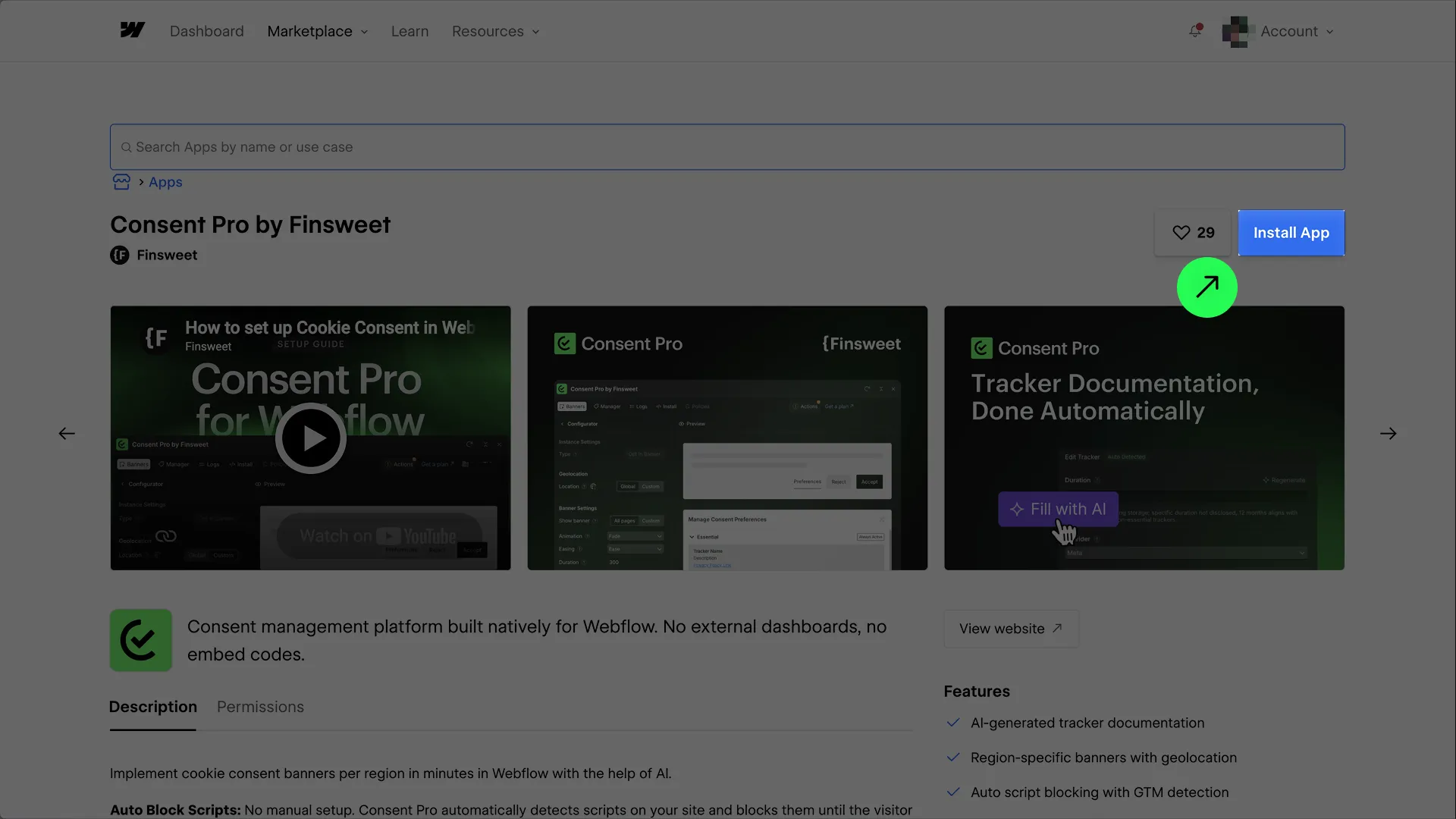
Consent Pro is installed as a **Webflow App** from the [Webflow Apps Marketplace](https://finsweet.info/consent-pro).

1. Open the Consent Pro listing on the Marketplace.
2. Click **Install App**.
3. After install, open the app from the Webflow Designer and complete setup (banners, scan, script in site head custom code, and license).

Full product setup is covered in [Using Consent Pro](/webflow/). For a walkthrough of setup after install, watch the tutorial below.
<iframe class="youtube-tutorial" src="https://www.youtube.com/embed/uj80BIJSb9k?si=7vBLzw8glLfhAIEV" title="Consent Pro setup tutorial - Cookie consent for Webflow" frameborder="0" allow="accelerometer; autoplay; clipboard-write; encrypted-media; gyroscope; picture-in-picture; web-share" allowfullscreen></iframe>

![Install Consent Pro from the Webflow Apps Marketplace](/lifecycle/1-install-from-marketplace.webp)

## Update

Consent Pro updates are available immediately once a new version is released to the Webflow Apps Marketplace. You do not need a separate update step for the app to pick up new releases.

Migrations for users who previously used the Finsweet Components version of Cookie Consent are handled automatically the first time they open Consent Pro. Keep using the Designer app and publish your site after configuration changes as usual.

## Uninstall

Uninstalling removes the Consent Pro **app**. It does **not** always remove runtime scripts from site custom code — complete [Manual cleanup](#manual-cleanup) and [Publish](#publish) so the published site stops loading Consent Pro.

You can uninstall at **project (site)** level or at **workspace** level.

### Uninstall at project level

Removes Consent Pro from **one site only**. Other sites in the workspace are unchanged.

1. Open the site in the Webflow dashboard and go to **Apps & Integrations** in the site settings sidebar.
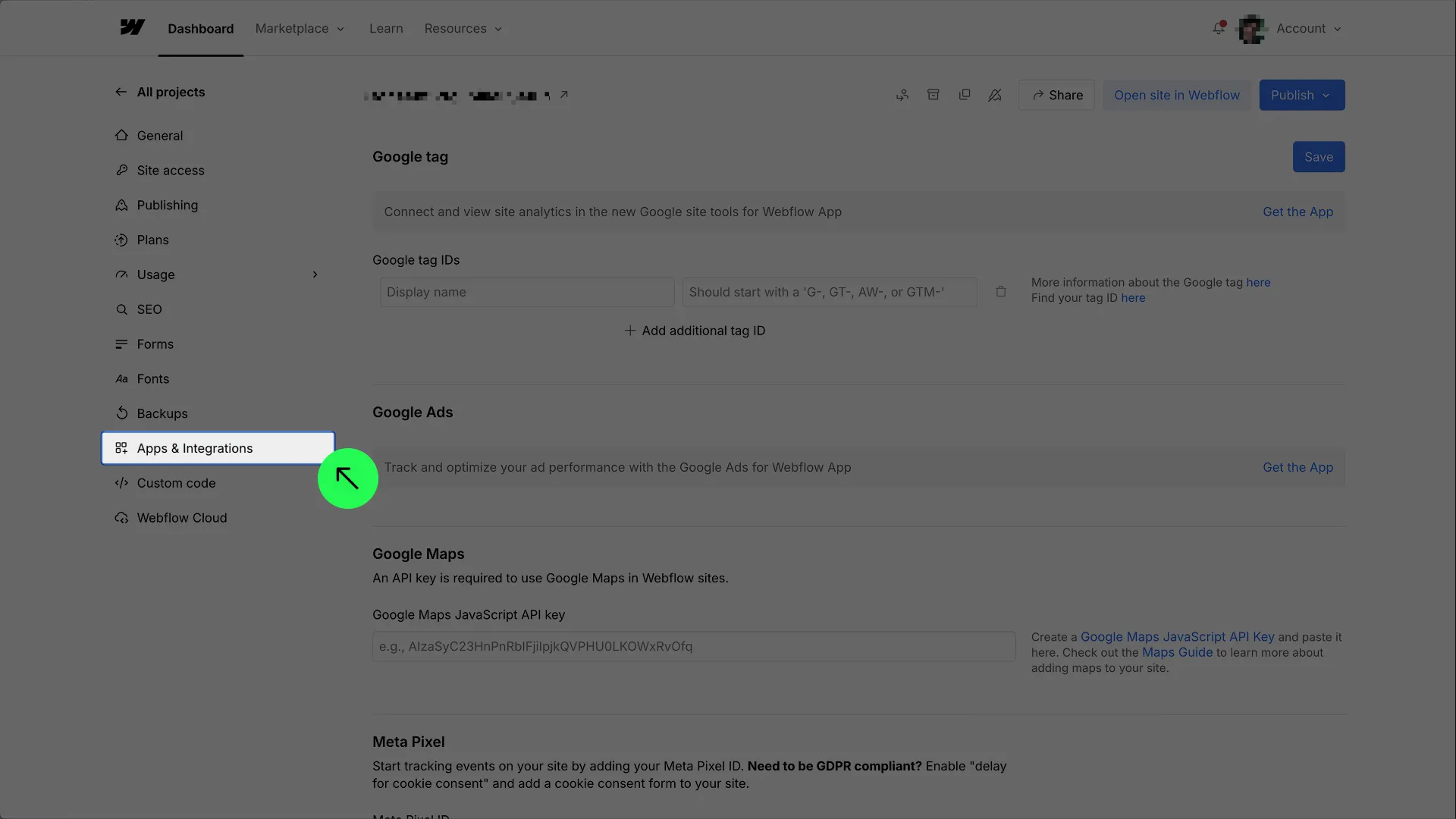
![Site settings — open Apps & Integrations](/lifecycle/1.1-uninstall-project-intergrations.webp)

2. Under **Connected Apps**, find **Consent Pro by Finsweet** and click **View details**.

![Connected Apps list — View details for Consent Pro](/lifecycle/2-uninstall-connected-apps-list-intergrations.webp)

3. In the app details modal, click **Uninstall App** and confirm.

![Uninstall Consent Pro at project level](/lifecycle/2.1-uninstall-from-project.webp)

### Uninstall at workspace level

Removes Consent Pro for the **workspace** (workspace-connected app access). Use this when you manage apps under workspace settings rather than a single site.

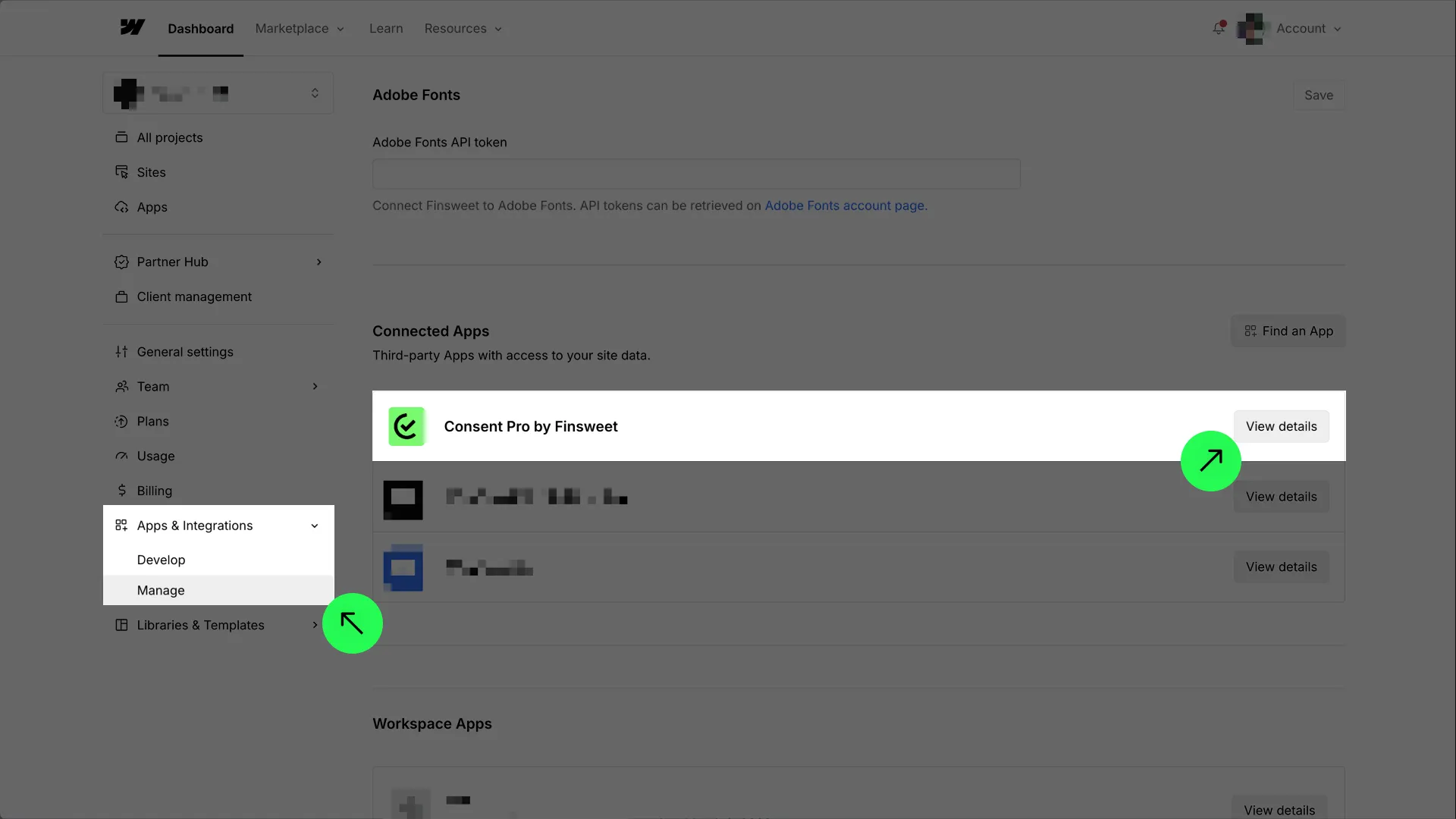
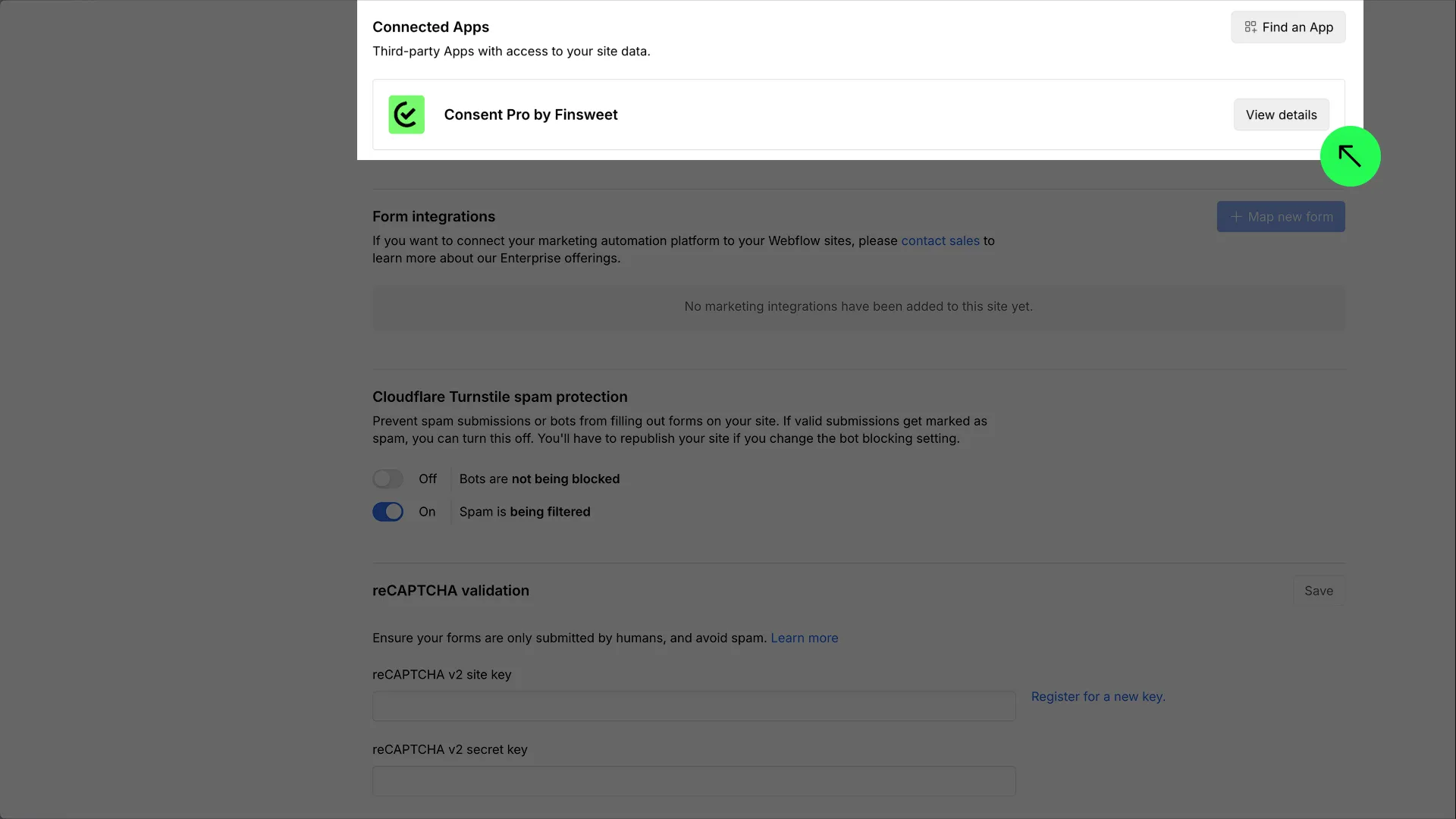
1. In the Webflow dashboard, open **Apps & Integrations** → **Manage** in the workspace sidebar.
2. Under **Connected Apps**, find **Consent Pro by Finsweet** and click **View details**.
![Workspace Apps & Integrations — Manage Connected Apps](/lifecycle/2.0-uninstall-workspace-intergrations-view.webp)

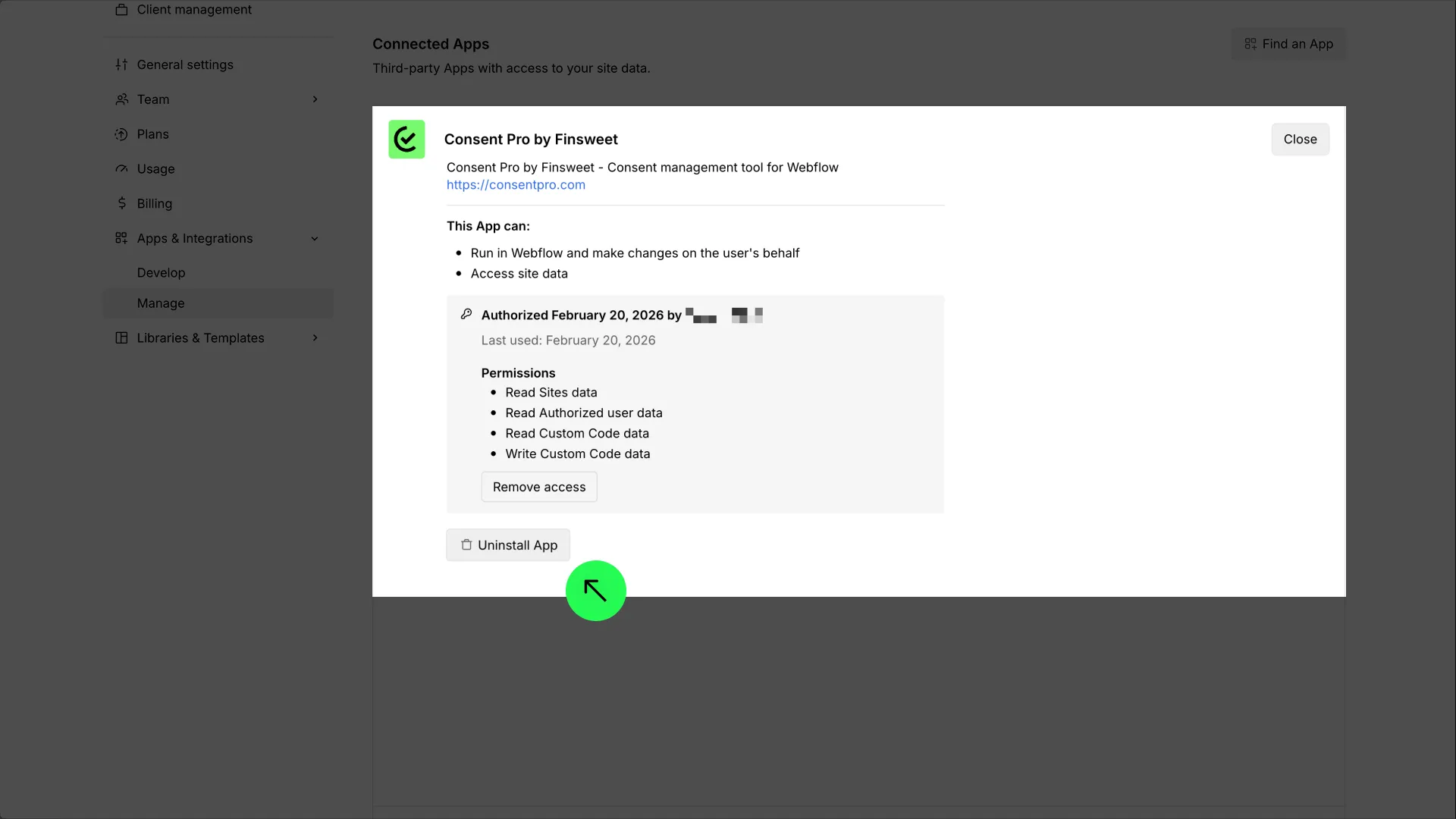
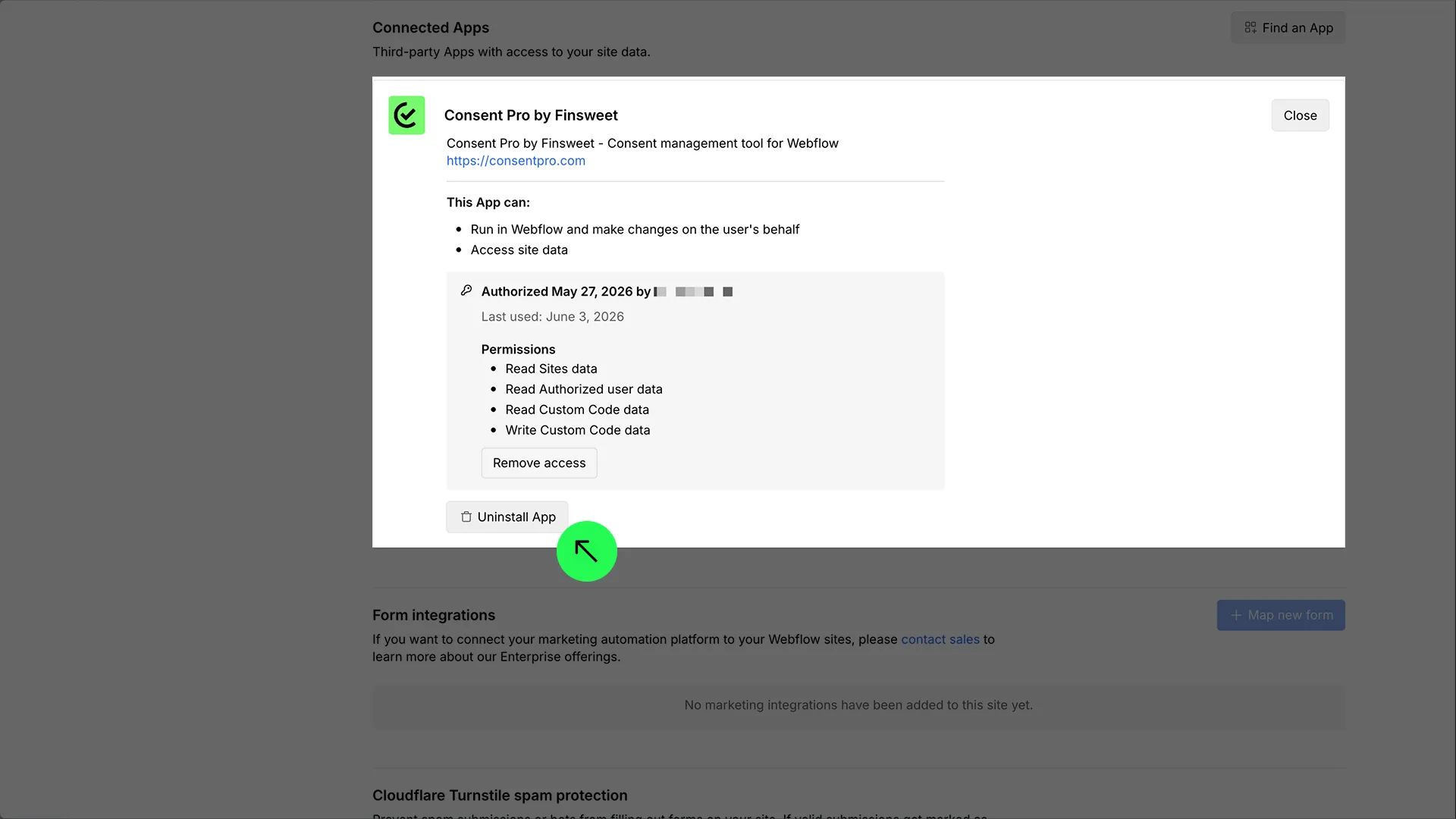
3. In the app details modal, click **Uninstall App** and confirm.
![Uninstall Consent Pro at workspace level](/lifecycle/2.11-uninstall-from-workspace.webp)

## Manual cleanup

After uninstalling the app, remove remaining Consent Pro pieces from the site so they no longer load or appear on the published site: the runtime script in **custom code**, and any Consent Pro elements on the Designer **canvas**.

### Steps

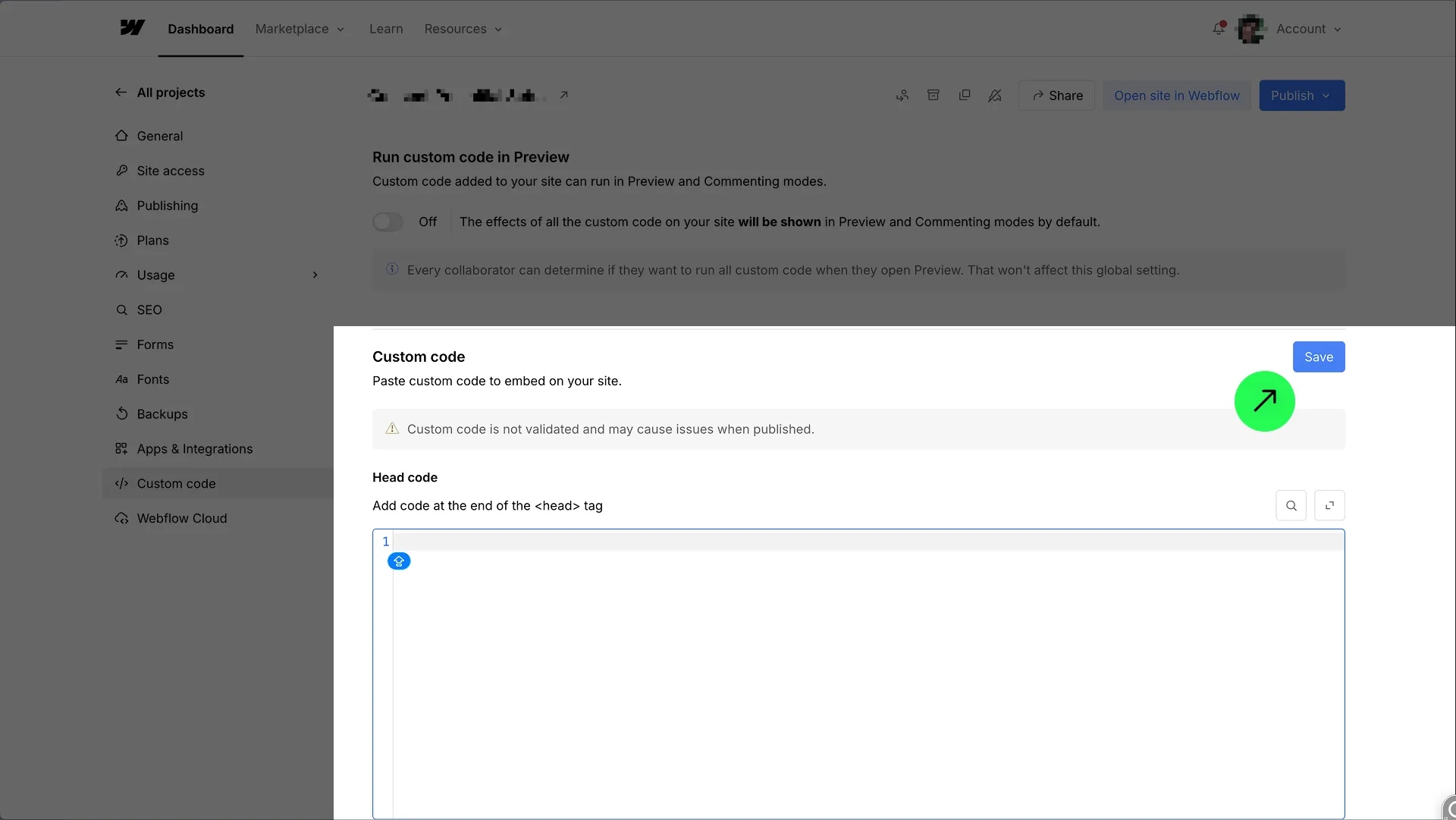
1. Open the site’s **Custom code** page in the Webflow dashboard:
   `https://webflow.com/dashboard/sites/{your-site-shortname}/custom-code`
2. Open the **Head code** editor.
![Site Custom code — Head code](/lifecycle/3-custom-code-view.webp)

3. Select and delete only the **Consent Pro** snippet (typically a comment like `<!-- Consent Pro script -->` and the matching `<script … data-consentpro-script …>` tag, or `<script … finsweet="consentpro" …>` in an older install). Leave all other custom code unchanged.

![Remove the Consent Pro script from Head code](/lifecycle/4-custom-code-remove.webp)

4. Click **Save**.
5. Open the site in the Webflow **Designer** and remove any Consent Pro elements from the canvas (for example the consent component wrapper, banners, preferences panel, open-preferences control, and placeholders). Delete only Consent Pro–related elements; leave the rest of your design unchanged.
6. If you used [async script loading](/runtime/script-loading) with manual blocking, restore any scripts and iframes you marked for consent. With Consent Pro uninstalled, those attributes no longer run and can break embeds or third-party scripts:
   - On **scripts**: remove `type="fs-consent"` and `fs-consent-categories` (restore a normal `type` such as `text/javascript` if needed).
   - On **iframes**: move the URL back from `fs-consent-src` to `src`, and remove `fs-consent-src` and `fs-consent-categories`.
   - Check both the Designer canvas and any **custom code** embeds where you applied these attributes.
7. [Publish](#publish) the site so custom code, canvas, and attribute changes go live.

### Unrelated custom code and design are preserved

Uninstalling Consent Pro and cleaning up does **not** require changing anything else on the site.

- In **Custom code**, leave all **other** head/footer scripts, meta tags, and third-party snippets as they are. Only delete Consent Pro–related entries (and, if applicable, fix async-loading attributes as above).
- On the **canvas**, leave all non–Consent Pro elements as they are — after removing Consent Pro components and restoring any `fs-consent` markup on scripts/iframes you still need.

## Publish

Cleanup only takes effect on the live (or staging) site after you **publish**.

1. Click **Publish** in the site header.
2. Choose the destination domains (staging and/or production).
3. Click **Publish to selected domains**.

![Publish the site after custom code cleanup](/lifecycle/5-publish-site.webp)

## Delete your data from our platform (optional)

If you want Finsweet to process a full wipe of your data related to our products, use the Forget Me flow:

**[https://finsweet.com/forget-me](https://finsweet.com/forget-me)**

That page explains how to proceed with the Forget Me service.

## Checklist

| Step                  | Action                                                                                                                                                                                |
| --------------------- | ------------------------------------------------------------------------------------------------------------------------------------------------------------------------------------- |
| Install               | Marketplace → **Install App** → complete setup in the Designer                                                                                                                        |
| Update                | New Marketplace releases are available immediately — no manual update step                                                                                                            |
| Uninstall (project)   | Site settings → **Apps & Integrations** → Consent Pro → **View details** → **Uninstall App**                                                                                          |
| Uninstall (workspace) | Workspace → **Apps & Integrations** → **Manage** → Consent Pro → **View details** → **Uninstall App**                                                                                 |
| Cleanup               | Custom code → remove Consent Pro head script → **Save**; Designer → remove Consent Pro canvas elements; if you used async loading, strip `fs-consent` attributes from scripts/iframes |
| Publish               | **Publish** to selected domains                                                                                                                                                       |
| Data deletion         | Optional: [finsweet.com/forget-me](https://finsweet.com/forget-me)                                                                                                                    |